The app for health professionals, at home and in clinic
Your practice. Your business. One tool. One tap, and your accountant has the summary.
CliniQ Pro (pronounced “Clinique Pro”) brings scheduling, patient records, signed notes, receipts and invoices, expenses and mileage together in one app. For self-employed health professionals: nursing, foot care, rehabilitation, mental health and many more. At year-end, a PDF summary sorted by income tax return line, ready for your accountant. Receipts ready for insurance and records protected under privacy laws (including Quebec's Law 25). Built by a licensed practical nurse who uses it every day.
14-day free trial, no credit card. Sign up before January 1: $10 off.
After the trial: $44.95 a month, or $449.50 a year (two months free). Taxes are added based on your province. See pricing →
Canadian app for health professionals, with data hosted in the country.
We'll write to you before the launch, with the getting-started guide. Your contact details are used only to write to you about CliniQ Pro.
For Android and iPhone, in preparation. In English and French.
The app, screen by screen
Take your time with each screen. Tap a picture to enlarge it. (Test account, fictitious patients.)
CliniQ Pro on video
Five short videos of about 35 to 50 seconds, made with a test account (fictitious patients).
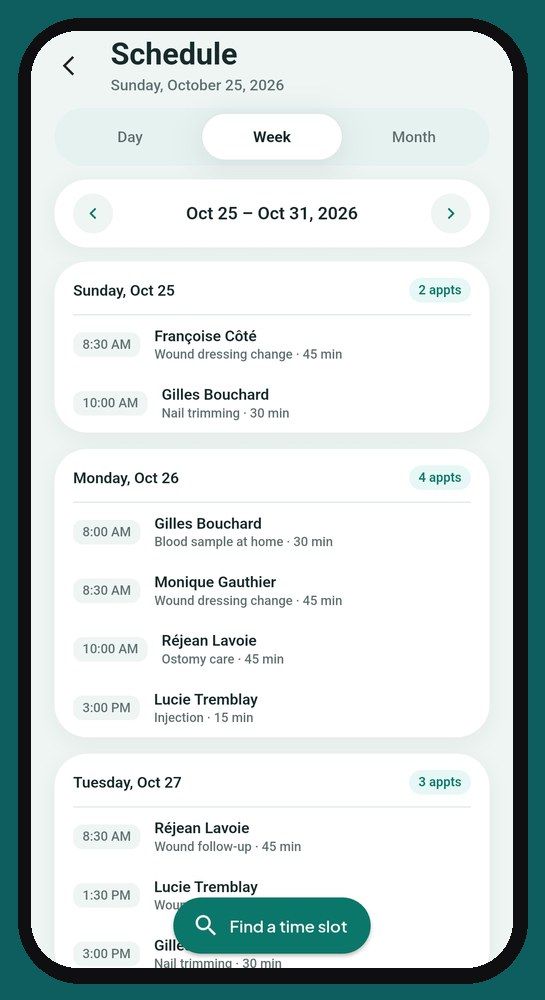
In the morning, everything waiting for you on one screen. The week and month calendar with statutory holidays, then the appointment with its consents, health summary, photos and note.
The patient record and health summary, a note written in your words or with the assistant, then reviewed and signed. Late notes, documents received and copies logged in the record.
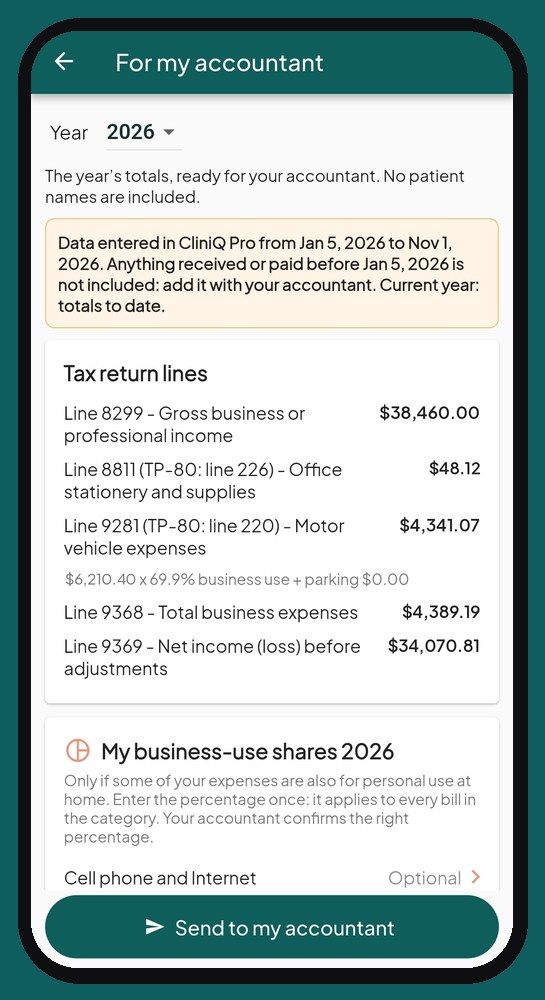
An invoice in a few taps and a PDF receipt. Expenses photographed with their receipt, mileage day by day, then the year-end summary for your accountant, with no patient names.
Step-by-step guidance, pouches checked off at the visit or scanned with the camera, spore test reminders and a code for each instrument.
The app locks itself, two-step verification, every consent recorded and dated, the patient decides about photos.
Before, six tools. Now, one app.
- the phone's calendar
- addresses copied by hand
- the mileage logbook
- the shoebox of receipts
- the income spreadsheet
- the paper records
Everything included, in one subscription
No add-on modules, no paid options. Here is everything CliniQ Pro includes, for $44.95 a month or $449.50 a year. Taxes are added based on your province. See the clinic management software in detail.
- ✓ Scheduling by location
- ✓ “Find a time” in the right place
- ✓ Appointment reminders by text
- ✓ Complete patient records
- ✓ Health summary, history and medications
- ✓ History of changes to the health summary
- ✓ Dated consents in the record
- ✓ Before/after photos
- ✓ Signed and locked notes
+ See the 18 other included features
- ✓ Dated late notes
- ✓ Assistant to help write your notes
- ✓ Access log
- ✓ PDF receipts with your licence number
- ✓ Expenses with a photo of the receipt
- ✓ Automatic mileage and odometer
- ✓ Dashboard: income this month and year to date, amounts to collect
- ✓ PDF income report: average per invoice, GST, QST or HST collected
- ✓ Year-end summary for your accountant
- ✓ No signal? Not stuck: notes, photos and receipts kept on the phone, then sent when the signal returns
- ✓ Sterilization log (if you sterilize)
- ✓ Import your patient list
- ✓ Two-step verification at sign-in
- ✓ Data hosted in Canada
- ✓ English and French
- ✓ Record copies with a log of who received them
- ✓ Statutory holidays shown in the calendar
- ✓ Export all your records at once: complete records as PDFs, patient list and received documents
At your patients’ homes, at your clinic, or both.
Do you go to your patients? Do they come to you? Do you do a bit of both? You choose once in your profile, and CliniQ Pro adjusts.
I go to my patients
The full route: directions in one tap, trips calculated and your mileage kept for you.
My patients come to me
The same tools: schedule, records, signed notes, receipts, expenses, sterilization log and the summary for your accountant. No route to drive, no mileage to keep.
Both
Each patient shows where you see them, at home or at the clinic. Only trips to your home-visit patients count in your mileage.
Is your clinic in your home? One button copies your address: nothing to retype.
A day with CliniQ Pro
From morning coffee to coming home. Work in a clinic? Same day, minus the driving.
-
7:45 am7:45 am
Coffee first, then the home screen.
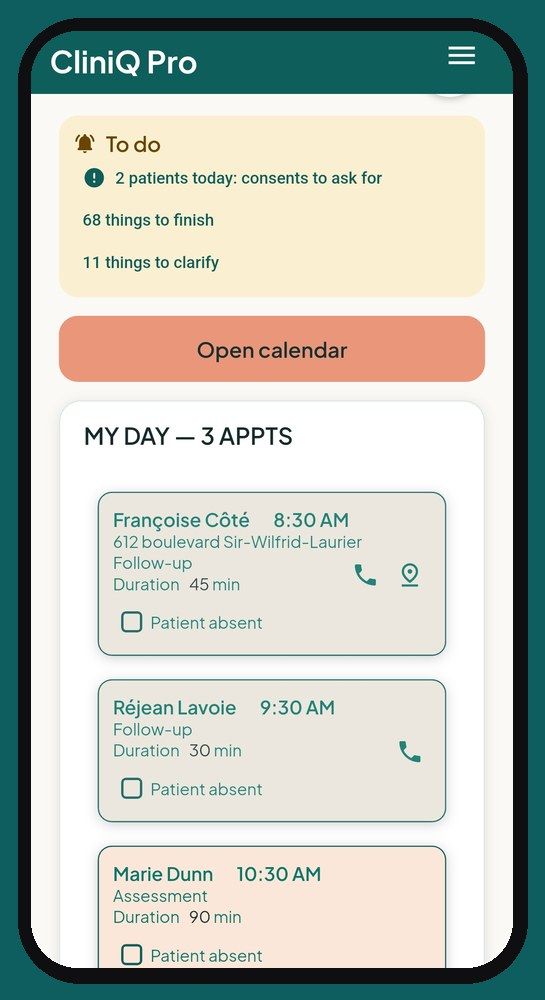
The home screen sticks to the essentials: what's left to complete, whether something slipped through the cracks, and today's appointments.
Your patients got their reminder by text the day before, on its own, 24 hours ahead.
A patient calls? “Find a time slot” suggests open times based on the drive from your previous visit, so you don't zigzag from one town to another.
-
8:10 am8:10 am
One tap, and the GPS is on its way.
Tap the appointment's directions icon: the route to the patient's home opens in your phone's GPS. No more copying addresses in the car.
-
8:30 am8:30 am
At your first patient's home, hands full.
Big buttons, few steps: everything works with one thumb, even with gloves on.
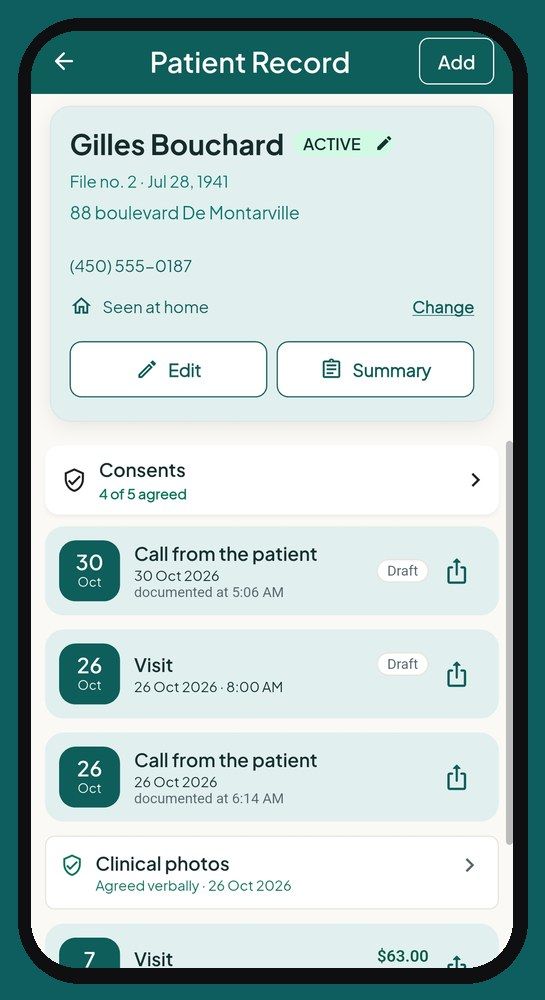
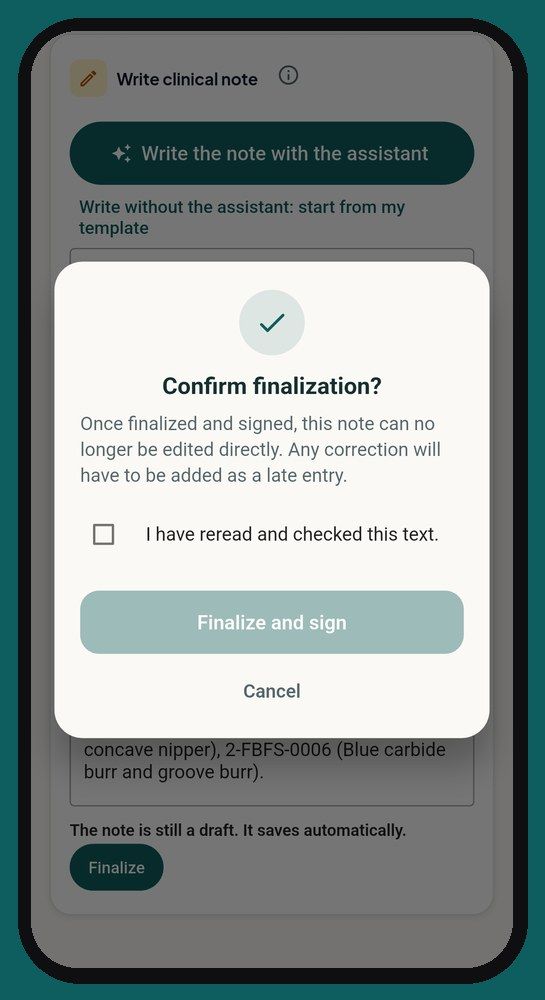
Signed, locked note
Once finalized, the note no longer changes. Forgot something? A dated late entry is added next to it.
Every sterile pouch traced
Tap the pouch you used. If a batch is recalled, you know right away which patients are affected.
Photos and consents
Photos sorted by side and by moment, before or after care. Consent can also be given by text message. The register keeps the consent, refusal or withdrawal, and who gave it: the patient or their representative.
+ See the rest of the day (5 steps)
-
9:20 am9:20 am
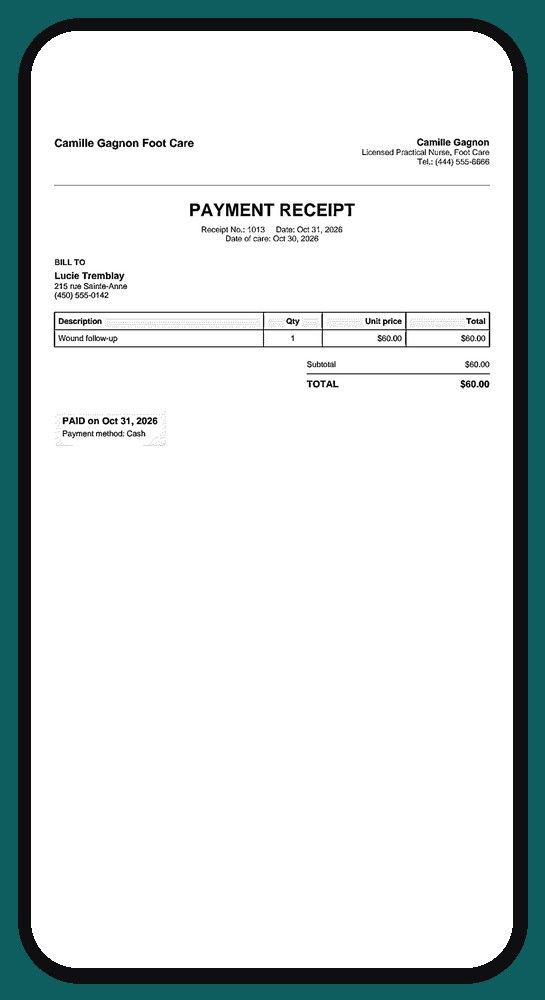
The receipt is sent before your coat is back on.
Invoices numbered with no gaps. The PDF receipt can be printed or sent to the patient by email or text message, with the date of their next appointment. Payment declined or wrong method? “Correct the payment”, in one tap. Your income is already counted.
-
12:05 pm12:05 pm
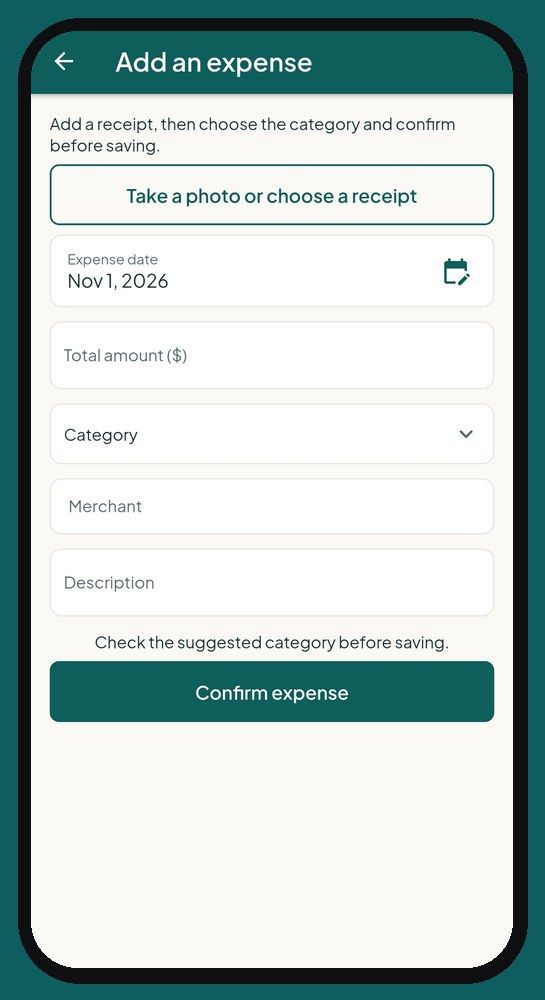
Filling up on gas? Snap a photo.
Photograph the receipt: the amount is read for you, a quick look to confirm, and the expense is filed with its supporting document. A bill that's also for home use, like your cell phone? You enter your business-use share once, and it's calculated on every bill.
-
5:40 pm5:40 pm
Back home, nothing to write down.
The trips between your visits are calculated for you from your schedule: tomorrow morning, your mileage log will be up to date. The odometer is one photo of the dashboard once a month, not every trip. No more logbook in the glove box.
-
6:15 pm6:15 pm
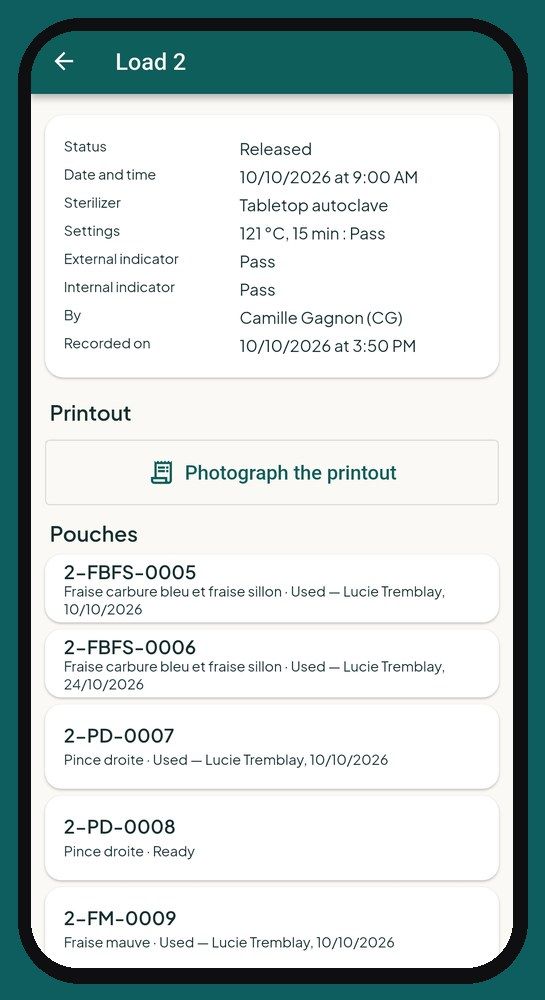
The sterilizer is done, and so is the log.
Record your cycle once it's finished: time, indicators read, numbered pouches. The pouch codes are scanned with the camera. Your spore tests have their place in the log. The day someone asks for it, your sterilization log is complete and up to date.
-
Dec. 31December 31
“Send to my accountant”
A single button prepares your annual summary as a PDF: your income, your expenses sorted by the lines of the income tax return, the business share of your shared expenses, your mileage and your vehicle's business-use share. Your expense receipts come along, with their photos. All that's left is to send it to your accountant.
+ More features: health history, documents, care plan, note assistant…
Your data goes where you go, both ways
Bring your whole patient list in at once: a CSV file taken from Excel or from the tool you use now. And keep a copy whenever you like: your patient list exports to CSV, and your expense receipts to PDF and CSV, with their photos.
Health history
Medical history and medications, with a record of every change.
Documents received
PDFs and photographed papers, filed in the patient's record.
Copy of a note
A PDF of a finalized note, and a register of copies released.
Nursing care plan (PTI) for nurses
Findings and directives, sent as a PDF to the practical nurse or the doctor, with photos from the last visit.
AI note assistant, included
Dictate what you did with your keyboard's microphone: the assistant (AI) writes a clear note, using professional terms. You review it, adjust if needed and sign. No extra cost.
Help in the app
A full page of frequently asked questions, with search, and an assistant (AI) that answers your questions about the app.
Your patients' records, protected at every step.
You remain responsible for your records. CliniQ Pro was built from the start to help you protect them.
Hosted in Canada
Records are hosted in Montréal. A few features rely on services outside Canada (reading receipts and the odometer, calculating trips, help, error reporting, sign-in with Google): the details will be in the privacy policy.
Encrypted
In transit (TLS) and on the servers (AES-256).
Your patients stay yours
The database itself prevents one account from seeing another account's patients.
Phone locked
Automatic lock, password or fingerprint. Screenshots blocked by default on Android (you can allow them in the settings), and no copy in the phone's backup.
Password protected
Forgot your password? A 6-digit code by email, then every session is closed, on every device.
Two-step verification
Required: a code from your authenticator app at each new sign-in. A stolen password is no longer enough.
Safeguards against mistakes
Locked notes, receipts that can't be changed, protected photos. A log keeps the important actions, and consents and copies released each have their own register.
Download CliniQ Pro safely
CliniQ Pro installs only from the official stores, Google Play and the App Store, just like all your other apps. No file to download from a website, no setting to change on your phone.
- Google and Apple review every app before offering it in their store.
- Updates arrive on their own, through the store.
- You can uninstall it at any time, like any other app.
About me
Nancy Proulx, a foot care practical nurse who works on the road, explains why she built CliniQ Pro for her own days with patients.
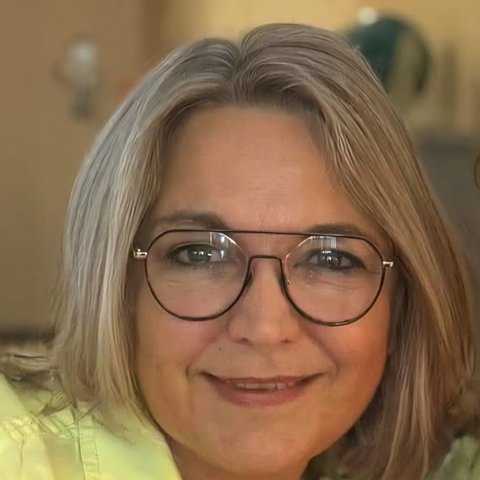
“I'm a licensed practical nurse specializing in home foot care. I built CliniQ Pro for my own days, and I use it in my patients' homes. Every screen has been tried on the road, phone in one hand, gloves on.”
Nancy Proulx, creator of CliniQ Pro
For home health care, across Canada
Nursing, foot care, wound and ostomy care, respiratory therapy, rehabilitation, physiotherapy and occupational therapy, mental health, dental care, denturism, medical aesthetics, massage therapy, speech therapy and audiology, social work, psychoeducation and special education, kinesiology, osteopathy, nutrition, mobile blood draws and other home-based practices. Your profile shows your profession and your regulatory college or professional order. The app is offered across Canada: British Columbia, Alberta, Saskatchewan, Manitoba, Ontario, Quebec, New Brunswick, Nova Scotia, Prince Edward Island, Newfoundland and Labrador, and the territories.
Why now
In Canada, nearly one person in five is 65 or older. In Quebec, that share is projected to grow from 21.7% in 2025 to 26.2% in 2051. According to the Canadian Institute for Health Information, about one in ten people newly admitted to long-term care could have stayed home with the right support. Care is moving closer to home, and it is often self-employed health professionals who make those visits. CliniQ Pro is the software and app that brings their schedule, records, receipts and mileage together: less paperwork, more time with the people they care for.
Sources: Statistics Canada (September 24, 2025), Institut de la statistique du Québec (July 2026), CIHI (October 2025).
Frequently asked questions
In the app, a whole page for your questions.
You're never alone in front of a screen. The “Help & feedback” page brings together more than 120 answers, sorted by topic, with a search bar: type “invoice” or “odometer” and the right answer comes up.
Didn't find it? Ask your question in your own words: an assistant (AI) answers right away, based on the app's help. And if it's still not solved, a button sends your question to support.
The assistant explains the app. It doesn't give clinical, legal or tax advice, and you never write any patient information in it.
In the meantime, here are the questions I'm asked most often.
Before you start
CliniQ Pro or Clinique Pro?
Same thing. The name is spelled CliniQ Pro and pronounced “Clinique Pro”. If you searched for Clinique Pro, Clini Pro or CliniQ, you're in the right place: it's the practice app for self-employed health professionals, at home and in clinic.
How much does CliniQ Pro cost?
$44.95 a month or $449.50 a year, after a 14-day free trial with no credit card. Taxes are added based on your province.
Does it work on iPhone?
Yes. CliniQ Pro will be available at the same time on Android and iPhone, on phones and tablets.
Do I need Internet access?
For most features, yes: your phone's cellular data is enough. Without a signal, you're not stuck: the app opens, appointments, notes and photos you've already viewed stay visible, and a note, a care photo or an expense receipt is kept on the phone, then sent on its own when the signal returns.
Can I use it on a tablet or a second phone?
Yes, with the same account, on a phone or a tablet.
If I stop, what happens to my data?
At any time, “Export all my records” gives you your complete records as PDFs, your patient list and received documents, all at once. Your expense receipts can be exported too. The rules for record retention and account closure will be set out in the terms of use.
Is it right for my profession?
Yes. CliniQ Pro is made for all home health care.
+ See 17 more questions
My patients come to my clinic. Is CliniQ Pro right for me?
Yes. You choose in your profile: at your patients’ homes, at your clinic, or both. You keep every tool (schedule, records, notes, receipts, expenses, sterilized instrument traceability, accountant summary). Only mileage isn’t used for patients who come to you.
Getting started
How do I bring in my current patients?
You can import them all at once, from a CSV file taken from Excel or from the tool you use now. You can also add them one by one.
Do my patients need an account?
No. Only the professional has an account. Your patients have nothing to install.
Is there help if I get stuck?
Yes. The app contains more than 120 answers, sorted by topic, with a search bar. An automated assistant (AI) also answers questions about using the app; never write any patient information in it.
Scheduling and the road
Does the app calculate my mileage?
Yes. The trips between your visits are calculated for you, and each day is logged on its own the next morning, with nothing to calculate. You photograph the odometer once a month.
My patient isn't home when I arrive. Is my trip lost?
No. You check “Patient absent” and the trip still counts, even without care.
Do my patients get a reminder?
Yes. A text message goes out on its own 24 hours before each appointment. One switch in Settings, nothing else to set up.
Does the app help me fit in a new appointment?
Yes. “Find a time slot” suggests open times based on the town and the length of the visit. The app also warns you if the travel time between two appointments looks too short.
Notes and records
Can I change a note once it's signed?
No, and that's on purpose. A finalized note is locked under your name, with the date and time. If you forgot something, you add a dated late entry next to it.
Can I file a prescription or a nursing care plan (PTI) I received?
Yes. A PDF or a photo of the document is filed in the patient's record, and the original stays intact.
Is there a sterilization log?
Yes. You record your cycles, your numbered pouches and your spore tests. Each pouch used is linked to the visit where it was used.
Money and your accountant
Can I bill for a product, like a cream?
Yes. You add it to the invoice after the care.
Does the app read my expense receipts?
Yes, from a photo: the date, the total and the merchant are filled in for you. You check before saving.
I also use my cell phone at home. How is that counted?
You enter your business-use share, as a percentage, once a year for the category: it applies to all your bills. For a specific bill, you can enter the business amount instead, with a note. Confirm the right percentage with your accountant.
What does my accountant receive?
A one-page PDF with the year's totals: income, expenses by category and vehicle, following the lines of the income tax return, and each tax on its own line (GST, QST, HST, PST), collected and paid. No patient names appear on it. Your accountant always confirms the classification.
What if I'm not registered for sales taxes?
The app takes that into account: no tax is added to your invoices. It warns you when your taxable sales get close to the threshold where registration becomes mandatory.
Security
What happens if I lose my phone?
The app locks itself and asks for your password to reopen. From another device, you can change your password and sign out your other devices.
Interested? Write to us.
Write to our support team: support@cliniqpromobile.ca. We read every message and answer every question.
Email support