
Home visit scheduling with real travel time
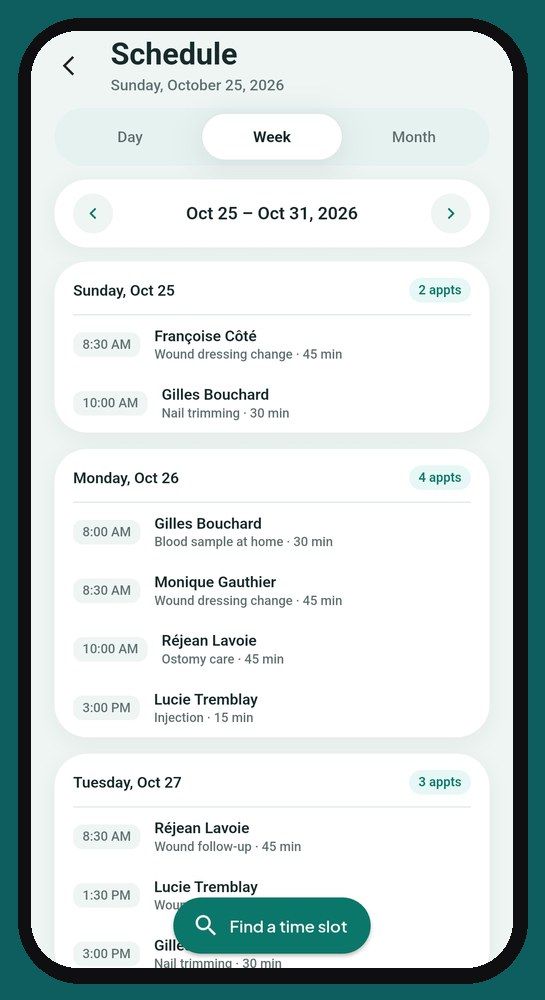
A schedule built for the road, not for an office.
When you care for patients at home, every appointment is also a drive. CliniQ Pro's schedule takes both into account. It's included in the CliniQ Pro software and app, for health professionals across Canada.
What matters, as soon as you open it
The home screen goes straight to the point: today's appointments, what is left to complete, and anything you may have missed. No menus to dig through between two patients.
One tap, and your GPS takes over
The directions icon on an appointment opens the route in your phone's GPS. No more copying addresses in the car.
Booking a new visit without zigzagging
“Find a time slot” suggests open times based on the city and the length of the visit. The app fills the days you have already started first, then opens a free day, starting from the end of the week.
On a free day, it learns from your habits: if you usually go to that city in the afternoon, it suggests the afternoon. It also follows the shape of your rounds, in a straight line (you finish somewhere else, for example where you sterilize) or in a loop (you come back home). A day at a care home, a residence or your clinic? Set it in “My schedule”: each day has its place and hours, and the suggested time slots follow them. See sample weeks.
The app also warns you if the travel time between two appointments looks too short.
Reminders go out on their own
A text message goes to your patient 24 hours before each appointment. One switch in Settings, nothing else to set up.
At home, at your clinic, or both
You choose once in your profile where you see your patients. Each patient shows whether they are seen at home or at the clinic, and the schedule takes it into account.
On your phone or tablet
The same account works on your phone and on a tablet. Your patients have nothing to install: only the professional has an account.
The app is available in English and French.
Frequently asked questions
Does the app help me book a new appointment?
Yes. “Find a time slot” suggests open times based on the city and the length of the visit, filling the days you have already started first and following your habits. It also warns you if the travel time between two appointments looks too short.
Do my patients need to install anything?
No. Only the professional has an account. Your patients have nothing to install.
Launching January 1, 2027
See the app screen by screen, then reserve your spot: we'll write to you as soon as it opens.
See the appReserve your spotSee pricing
Sign up before January 1: 14-day free trial + $10 off your first payment.
A question? support@cliniqpromobile.ca
Features
- Patient records and notes
- Receipts and invoices
- Automatic mileage
- Expenses and accountant
- Sterilization log
- Home care services, all in one
- Questions and answers
- Pricing
For your profession
- Nursing
- Foot care
- Wound and ostomy care
- Physiotherapy, occupational therapy
- Respiratory therapy
- Mental health
- Mobile dental care
- Denturism
- Medical aesthetics
- Massage therapy
- Speech therapy and audiology
- Social work
- Psychoeducation and special education
- Kinesiology
- Osteopathy
- Mobile blood draws
- Dietitians
Guides and comparisons
- 2026 software ranking
- Clinical documentation and mobile charting
- Clinic management software
- Practice management for solo practitioners
- Guide: choosing your software
- Jane App alternatives
- CliniQ Pro vs Jane
- App tour
- Import your patients
- Mileage deduction
- GST, HST and QST
- Who pays for what
- Money in your practice
- RPN, LPN and RN private practice
- FR-EN glossary of titles
- Getting started