
Expense tracking and a year-end summary for your accountant
Your expenses sorted, your accountant served.
Gas, supplies, cell phone: each expense is filed with its receipt the moment you make it. It's included in the CliniQ Pro software and app, for health professionals across Canada. GST/HST and QST: the 2026 guide for health professionals.
A photo of the receipt, and it is filed
From a photo, the date, the total and the merchant are filled in for you. You check before saving, and the photo stays attached to the expense.
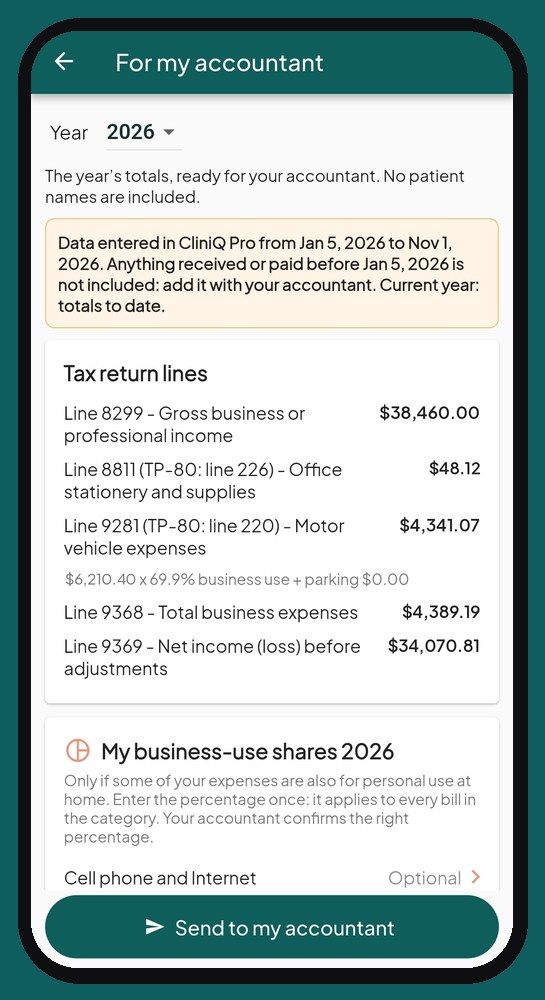
Expenses shared with your home
For a bill that is also used at home, like your cell phone, you enter your business share, as a percentage, once a year for the category. For a specific bill, you can enter the business amount instead, with a note.
“Send to my accountant”
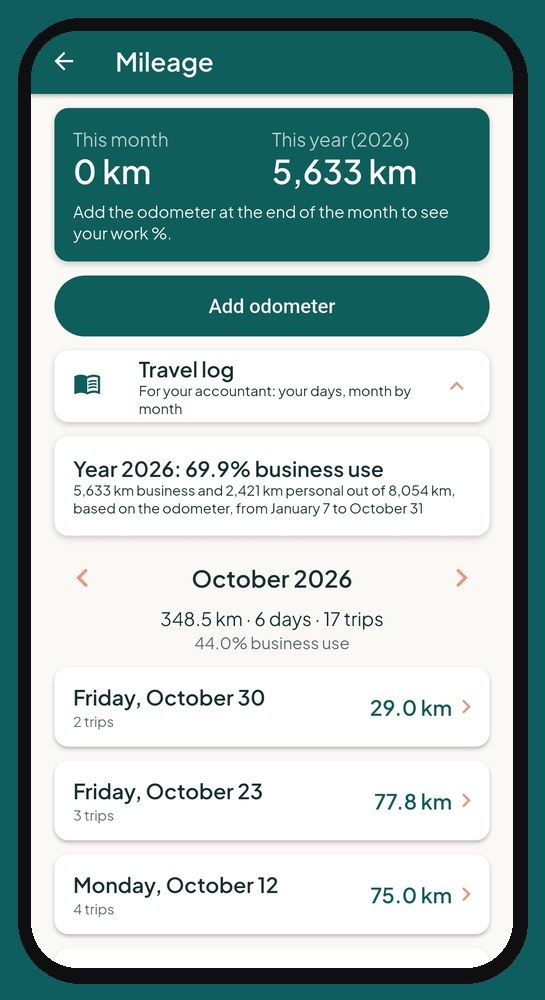
One button prepares your year-end PDF summary: income, expenses sorted by income tax return line, the business share of shared expenses, mileage and vehicle business use. Your detailed receipts, with their photos, export separately for your accountant. No patient names appear.
The app is available in English and French.
Sales tax report: monthly, quarterly or yearly
If you are registered for sales tax, CliniQ Pro prepares your sales tax report for your filing frequency: every month, every quarter or once a year. It shows the tax collected on your taxable sales, the input tax credits on your expenses and the amount to remit, laid out like your GST/HST return (and QST in Quebec). Exempt health services are counted separately. One button produces the report as a PDF.
Not registered yet? The app tracks your taxable sales over the last four quarters and warns you as you approach the $30,000 threshold.
Based on your province
The accountant summary and your receipts adapt to the province in your profile:
- Quebec: federal T2125 lines, with the matching TP-80 line, and GST + QST.
- Ontario, New Brunswick, Nova Scotia, Prince Edward Island, Newfoundland and Labrador: T2125 and HST.
- British Columbia, Saskatchewan, Manitoba: T2125, GST and PST, each in its own box.
- Alberta and the territories: T2125 and GST.
Your accountant always confirms the classification.
Frequently asked questions
Does the app read my expense receipts?
Yes, from a photo: the date, the total and the merchant are filled in for you. You check before saving.
Is there a quarterly sales tax report?
Yes. If you are registered for sales tax, pick your frequency (month, quarter or year): your GST/HST report, and QST in Quebec, is prepared for you with the amount to remit, as a PDF.
What does my accountant receive?
A one-page PDF with the year's totals: income, expenses by category and vehicle, by income tax return line. No patient names appear. Your accountant always confirms the classification.
Launching January 1, 2027
See the app screen by screen, then reserve your spot: we'll write to you as soon as it opens.
See the appReserve your spotSee pricing
Sign up before January 1: 14-day free trial + $10 off your first payment.
A question? support@cliniqpromobile.ca
Features
- Scheduling and routes
- Patient records and notes
- Receipts and invoices
- Automatic mileage
- Sterilization log
- Home care services, all in one
- Questions and answers
- Pricing
For your profession
- Nursing
- Foot care
- Wound and ostomy care
- Physiotherapy, occupational therapy
- Respiratory therapy
- Mental health
- Mobile dental care
- Denturism
- Medical aesthetics
- Massage therapy
- Speech therapy and audiology
- Social work
- Psychoeducation and special education
- Kinesiology
- Osteopathy
- Mobile blood draws
- Dietitians
Guides and comparisons
- 2026 software ranking
- Clinical documentation and mobile charting
- Clinic management software
- Practice management for solo practitioners
- Guide: choosing your software
- Jane App alternatives
- CliniQ Pro vs Jane
- App tour
- Import your patients
- Mileage deduction
- GST, HST and QST
- Who pays for what
- Money in your practice
- RPN, LPN and RN private practice
- FR-EN glossary of titles
- Getting started